
Turn your match video into highlights and stats

MVA360 is desktop software for grassroots and junior soccer. Play the video, press T when something happens, and MVA360 builds the clips, highlight reels, match reports and season statistics for you.

Try one game free See plans and pricing No card needed for the trial. For Windows and Mac.
Save, Ollie #1 Goal, Zara #4 Tackle, Ethan #9 Assist, Ruby #12
AttackingDefending and goalkeepingGeneral play

From full-time whistle to highlights in an evening

You bring the video from a phone, action camera or auto-tracking camera. MVA360 does the rest on your own computer.

  1. Set up the game

    Choose your squad, the opponent and the match video, then tick who played and who started.

  2. Tag the moments

    Press T, pick the player and what happened. Or tag later: mark moments now and sort them after the game.

  3. Get the outputs

    Event clips, a match highlight reel, a highlight reel for each player and a match report, ready to share.

  4. Follow the season

    Season Centre adds up every game: results, minutes played, goals, tackles, saves and more.

Built for the sideline, not the analyst's office

Big buttons, keyboard shortcuts and plain language. If you can play a video, you can tag a game.

The tagging screen: play controls, the match timeline with coloured event dots, and the list of tagged events The Tag Event panel with a button for each player and each event type

Tag as the game plays

Every player has a button and every event has a button. Each tag lands on the timeline, so you can jump straight back to any moment.

Coaches can also record substitutions, so MVA360 knows exactly who was on the pitch and for how long.

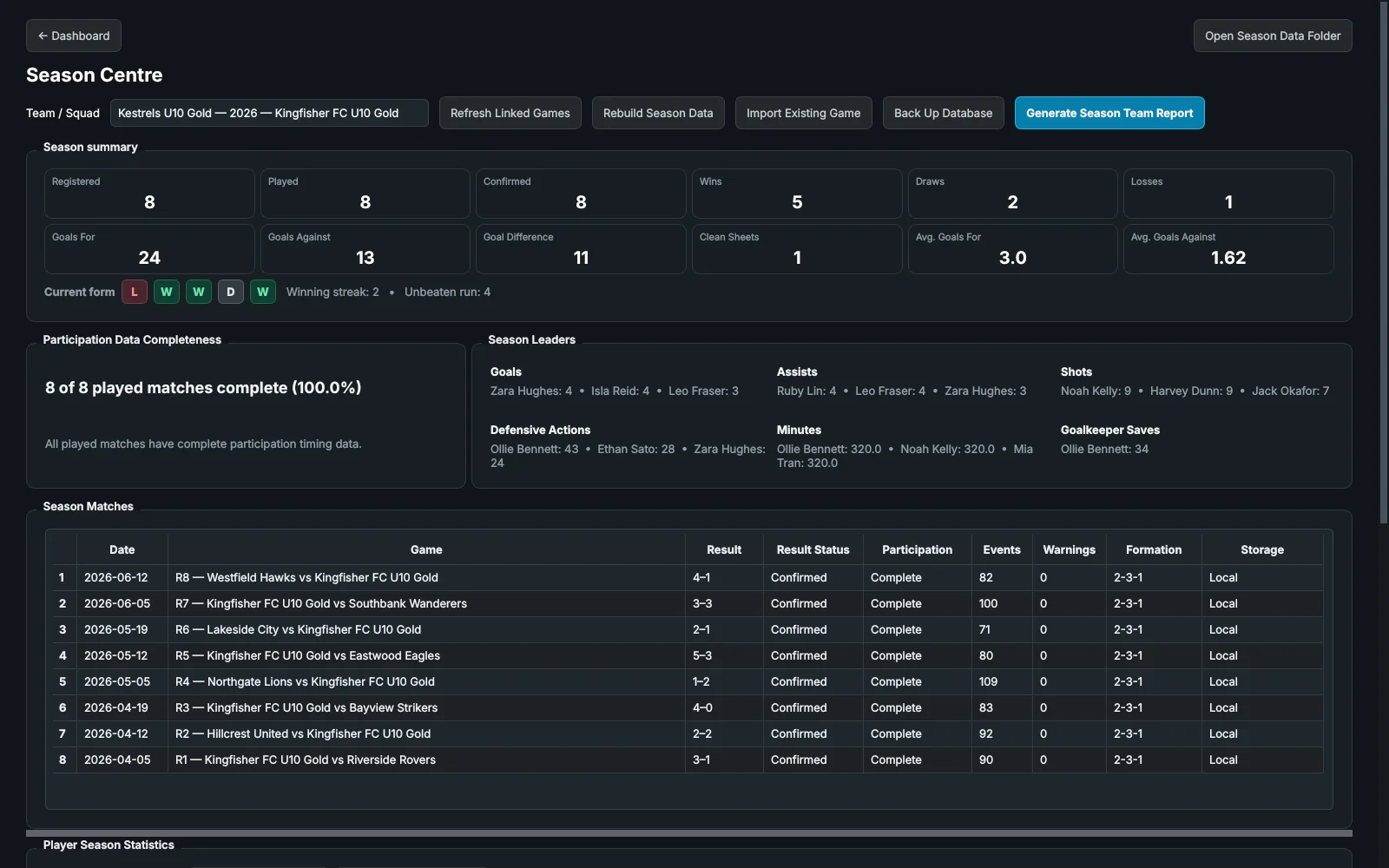
Season Centre showing wins, losses, goals, current form, season leaders and the list of matches

See the whole season

Results, recent form and season leaders update as you add games. Every player gets their own statistics, game by game.

Build an end-of-season highlight reel for any player from the moments you tagged all year.

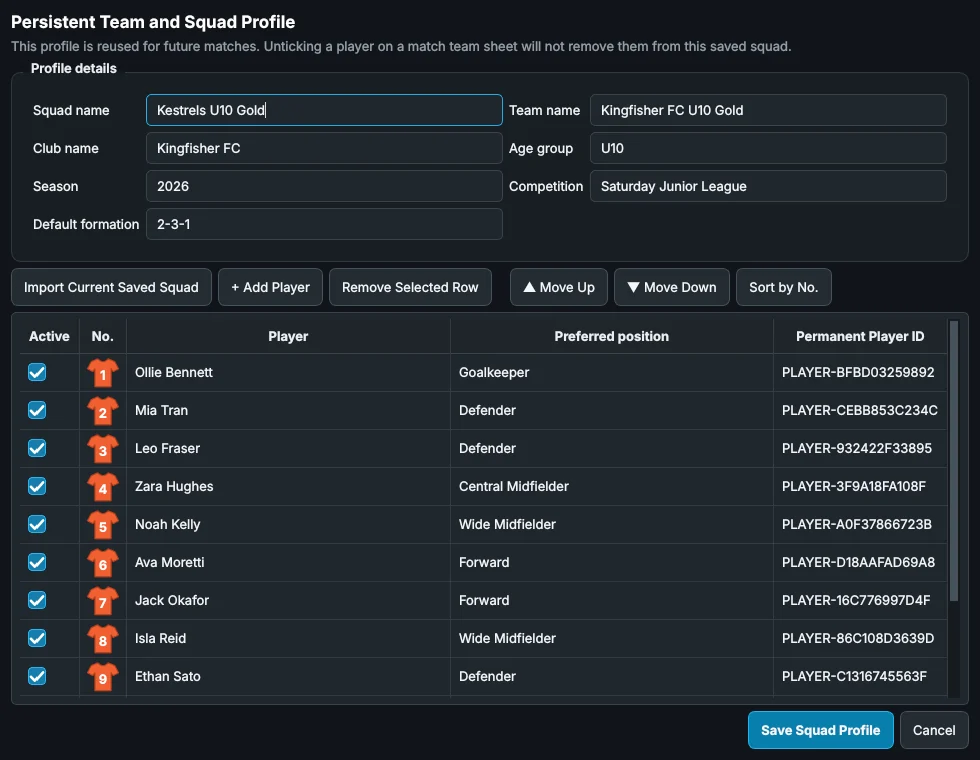
A squad profile with shirt numbers, player names and preferred positions

Set your squad up once

Add players, shirt numbers and positions once. Every new game starts with the team sheet ready, and next season carries the same players across.

Your videos stay on your computer

Junior football footage is personal. MVA360 is desktop software, so nothing about your players leaves your computer unless you share it.

  • Nothing is uploadedMatch videos, player names, tags and statistics stay in the folder you choose.
  • Works at the groundTag without an internet connection. MVA360 only needs to check your plan once every 14 days.
  • Your originals are never changedMVA360 reads your video and saves clips and highlights as new files.
  • Your files are yours to keepClips, reels and reports are ordinary files. Keep them, share them or finish them in iMovie, even if you stop subscribing.

Plans and pricing

Every plan includes tagging, clips, highlight reels and match reports. Start with one free game, with every feature.

 Annual plans: 12 months for the price of 10.

Parent

For parents following one team and making highlight reels.

$20a month

Billed monthly. Cancel any time.

  • Tag as you watch, or tag later
  • Event clips and highlight reels
  • Match reports
  • 1 squad each season
  • 1 computer
  • Match Control and minutes played
  • Season Centre
Try one game free

Coach

For coaches who want minutes played and the whole season in one place.

$25a month

Billed monthly. Cancel any time.

  • Everything in Parent
  • Match Control: substitutions and minutes played
  • Season Centre and season reports
  • End-of-season player reels
  • 2 squads each season
  • 2 computers
Try one game free

Club

For clubs and academies running several teams.

$49a month

Billed monthly. Cancel any time.

  • Everything in Coach
  • Unlimited squads each season
  • 5 computers
Try one game free

Prices are in Australian dollars. Subscriptions open in March 2027. See the cancellation and refund policy.

Questions

What do I need to run MVA360?

A Windows 10 or 11 PC, or a Mac running a recent version of macOS, and your match video as a normal video file (for example MP4 or MOV). A laptop is fine. Making highlight reels is faster on a newer computer.

Which cameras does it work with?

Any camera that saves a normal video file: phones, action cameras and auto-tracking cameras. MVA360 works from the downloaded video, so the camera brand doesn't matter.

How does the free trial work?

Your first game is free, with every feature. No card is needed. The trial is used when you select Start Match on your first game, and you can keep working on that game afterwards. To start another game, choose a plan.

Can I cancel?

Yes, at any time. Your plan stays active until the end of the period you've paid for. Everything you've made stays on your computer, and you can still open your existing games.

Do I need internet at the ground?

No. MVA360 works offline. It checks your plan in the background when you're online, and keeps working for 14 days without a connection.

Can I use it on more than one computer?

Yes: Parent covers 1 computer, Coach 2 and Club 5. You can move your licence to a new computer from inside the app.

Can I change plans later?

Yes. Upgrade or downgrade at any time, for example from Parent to Coach when you want Season Centre.

Try it on your next game

Try one game free